Faxes?
Invented in 1843 by Alexander Bain.
Make it effortless for providers to identify eligible patients and refer them to your solution, without leaving their current workflow.
Invented in 1843 by Alexander Bain.
Nobody is visiting your portal, and when they do it takes 25 clicks to send a referral.
Clunky, costly and won't be done for another 6 months at best.
Impossible to maintain.
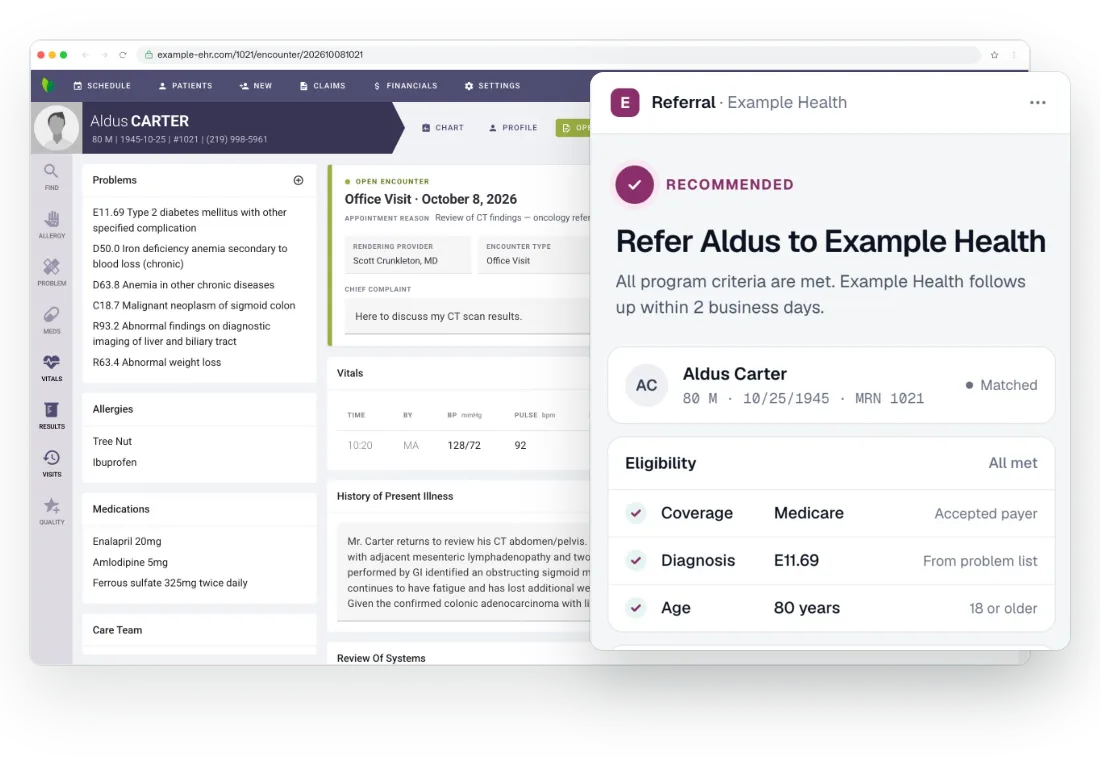
A button in the EHR that lights up for the patients who fit your criteria, and a referral form filled from the chart.
Referring clinicians see which patients qualify as the chart opens. The button lights up only for patients who fit your criteria, and the check runs before anyone clicks.
The referral form fills itself from the chart. Demographics, contact details, insurance and the clinical reason come from the record, with no extra clicks.
Status comes back into the referring provider's chart, so they see what happened to the patient without leaving the EHR or calling you.
Demographics, insurance, the referring physician and NPI, and the clinical reason all come from the chart, so nobody is chasing basics.
Status comes back to the chart they already work in. That visibility is what earns the next referral.
Less than you'd think, which is why referrers keep using it.
Chrome or Edge, one install per workstation. Practices that manage browsers centrally can deploy it by policy.
The button uses the sign-in the physician already has. No new password and no portal.
The button stays quiet until a patient fits your criteria. There is no interface for the practice to build or maintain.
SaRA Health used Bridge to work across its customers' EHRs without building integrations. The same platform carries your referral button.
Bridge was built developer-first. The Bridge SDK allows for even more customization and innovation. Take a look at our public SDK and get in touch to learn how to inject your existing platform into the EHR.
import {
  getPatient,
  onPatientChanged
} from '@arrowhealth/bridge-sdk'

getPatient().then(
  patient => console.log('patient', patient)
)

const offPatientChanged = onPatientChanged(patient => {
  console.log('patient:changed', patient.id)
})

// offPatientChanged() call when page or application unloads
Twenty minutes, and a patient who matches your criteria. Shortly after, we'll set you up with a working demo you can install and use yourself.