

An integration per EHR
Every new customer runs a different system, and each one becomes its own project before your product can appear in the chart.
A referral button, an enrollment form, or your entire platform, under your brand, in the chart at the moment clinical decisions are made.
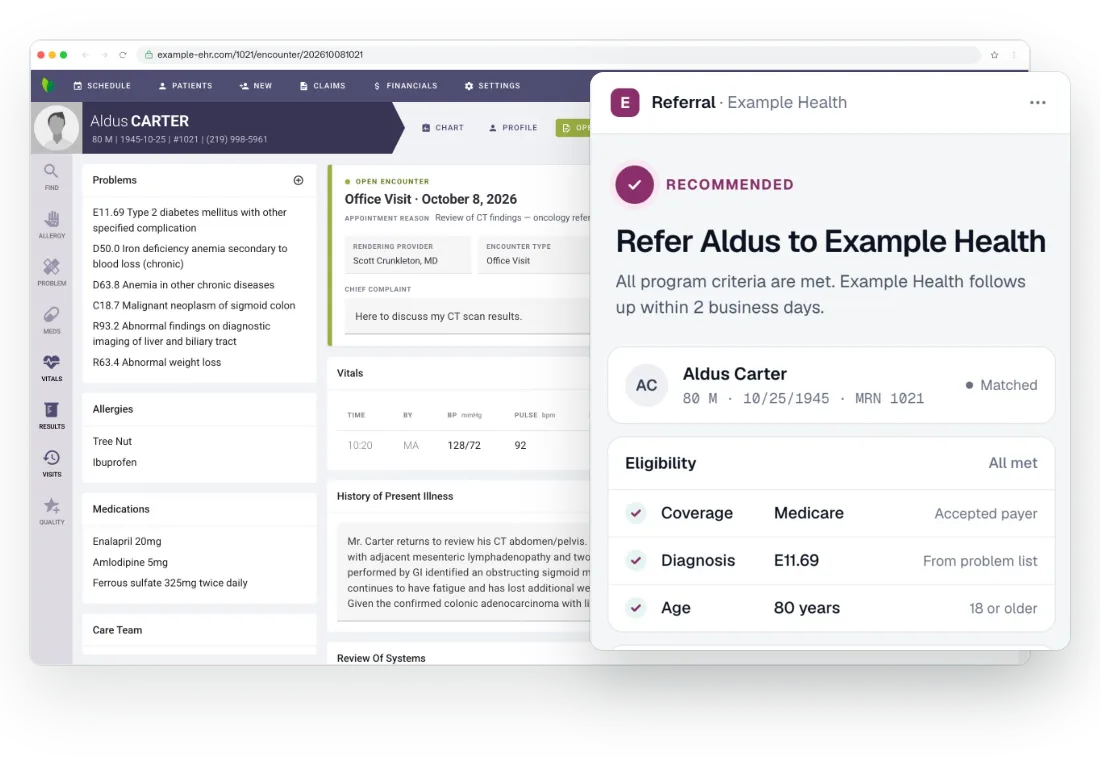
You won the customer. Now your product has to show up in their EHR, at every site, in front of physicians who have never heard of it.
Every new customer runs a different system, and each one becomes its own project before your product can appear in the chart.
Even on the same EHR, each practice has its own rollout, its own IT and its own timeline.
The product works, but it lives in a portal, and enrollment depends on someone remembering to open it.
One layer between your product and every EHR it needs to run in.
Your product appears beside the chart in a panel that carries your name and your sign-in. Physicians never see Bridge.
Patient, encounter, insurance and problem list arrive in one shape, whichever EHR the practice runs.
Your criteria run in the physician's browser against the chart that's open, so your button lights up for the patients who qualify and stays quiet for the rest.
When an EHR changes its screens, we update Bridge. Your product doesn't change.
Managed: send us your form or portal; we build and run the tile and panel, with uptime committed through to your endpoints.
SDK: chart-context events, tile and panel control, OIDC sign-in. Your UI, running in our extension.
import { getPatient, onPatientChanged } from '@arrowhealth/bridge-sdk'

getPatient().then(patient => console.log('patient', patient))

const offPatientChanged = onPatientChanged(patient => {
  console.log('patient:changed', patient.id)
})
Bridge already runs where your customers work.
As of September 2026.
Running today in
All product names are trademarks of their respective owners. Their use here indicates the systems Bridge runs in and does not imply endorsement or affiliation.
Three companies put their product beside the patient chart. Here is what it did for growth, lead conversion and time to go live.
 Social determinants of health in cancer careEHR go-live in weeks, not monthsWhat once took months and massive investment is now a turnkey, revenue-generating process, with implementation down from 6 months to approaching 6 weeks.~6 weeks to go live in a customer's EHR, down from 6 monthsFaster deploymentAdoptionRead the case study
  Remote therapeutic monitoringOne site to hundreds of practicesSaRA Health used Bridge to work across its customers' EHRs without building integrations, and grew from a single site to hundreds of practices.3,262% increase in RTM enrollmentMulti-EHR scaleAdoptionRead the case study
  Chronic care managementTwice the lead conversion, from inside the chartA 5% lift in enrollment would have been game-changing. Arrowhealth Bridge delivered 5x the growth MetaPhy was expecting.2× lead conversion, against MetaPhy's other lead sourcesHigher conversionAdoptionRead the case study
 Here's how they stack up, including where going through the EHR is the better fit.
| Capability | Integrate through the EHR | Bridge |
|---|---|---|
| Physicians see you in the chart | Depends on what the EHR offers; often data only | Yes, beside the chart on patients who qualify |
| Whole-population data | Yes, e.g. every diabetic patient in a practice | No, only the chart that's open |
| Custom order sets | Yes, inside the EHR's own ordering | No, works alongside the EHR's ordering |
| EHRs covered | One at a time | 38 browser-based EHRs |
| Desktop EHRs | Yes | Not supported |
| Time to live | Months per EHR | 45 days or less |
| What the clinic has to do | An IT project per site | Install the extension on each workstation |
| When the EHR changes | You and the vendor update it | We update Bridge |
Twenty minutes, and your product or workflow beside the chart. Shortly after, we'll set you up with a working demo you can install and use yourself.